EazyCare AI's Symptom Checker is an artificial intelligence–powered triage tool designed to help users in Southeast Asia assess their symptoms and decide the appropriate level of care — self‑care, primary care, or emergency. It uses a structured symptom input process, references regional disease prevalence (including dengue, malaria, and leptospirosis), and complies with local privacy regulations such as Malaysia’s PDPA. As of 2022, internet penetration in the region reached 73 percent, enabling over 460 million people to access digital health tools like this one.
Key Takeaways
- EazyCare AI’s symptom checker provides a step‑by‑step triage recommendation based on your reported symptoms, medical history, and risk factors relevant to Southeast Asia.
- Accuracy studies show that users find symptom checkers helpful in deciding whether to seek care — 70% of users in a Journal of Medical Internet Research study reported they helped them decide (JMIR 2020).
- The tool is free to use, works on low‑bandwidth connections, and supports multiple languages (English, Bahasa Malaysia, Thai, Vietnamese).
- Your data is encrypted and processed under Malaysia’s PDPA; you can delete your session data at any time.
- The symptom checker is not a substitute for a doctor. It is a screening aid, especially useful for distinguishing common tropical illnesses from mild viral infections.
Introduction
A mother in Kuala Lumpur notices her child has a high fever, muscle aches, and a rash. It’s the monsoon season, and dengue cases are surging. She wonders: should she rush to the emergency department, or can it wait until the clinic opens tomorrow? This exact scenario plays out thousands of times every year across Southeast Asia, where the line between a benign viral illness and a potentially life‑threatening tropical infection is often blurred.
In many parts of the region, access to a doctor is not always immediate. Rural areas may be hours from the nearest hospital, and urban emergency rooms are strained. Digital health tools — especially AI‑driven symptom checkers — can fill the gap by providing immediate, evidence‑based triage. However, most symptom checkers are designed in the West and fail to account for the unique disease patterns, language needs, and privacy concerns of Southeast Asia.
EazyCare AI’s symptom checker was built specifically for this region. It integrates local epidemiological data, adheres to the Personal Data Protection Act (PDPA) in Malaysia, and works on low‑bandwidth connections common in many parts of the region. This guide walks you through every step of using the tool — from accessing it on your phone to interpreting the results and deciding your next move.
Throughout this article, we will cite published evidence, explain the limitations of AI triage, and show you how EazyCare AI complements, rather than replaces, professional medical care. For more context on how the platform fits into the broader digital health ecosystem, visit the EazyCare AI about page.
How to Access EazyCare AI’s Symptom Checker
You can start the symptom checker directly from the EazyCare AI website or via the mobile‑optimised web app. No download is required for the web version, and a native app for iOS and Android is in pilot testing. The tool is free to use and does not require registration for a single symptom check — though creating a free account allows you to save your history and receive follow‑up reminders.
Opening the Checker
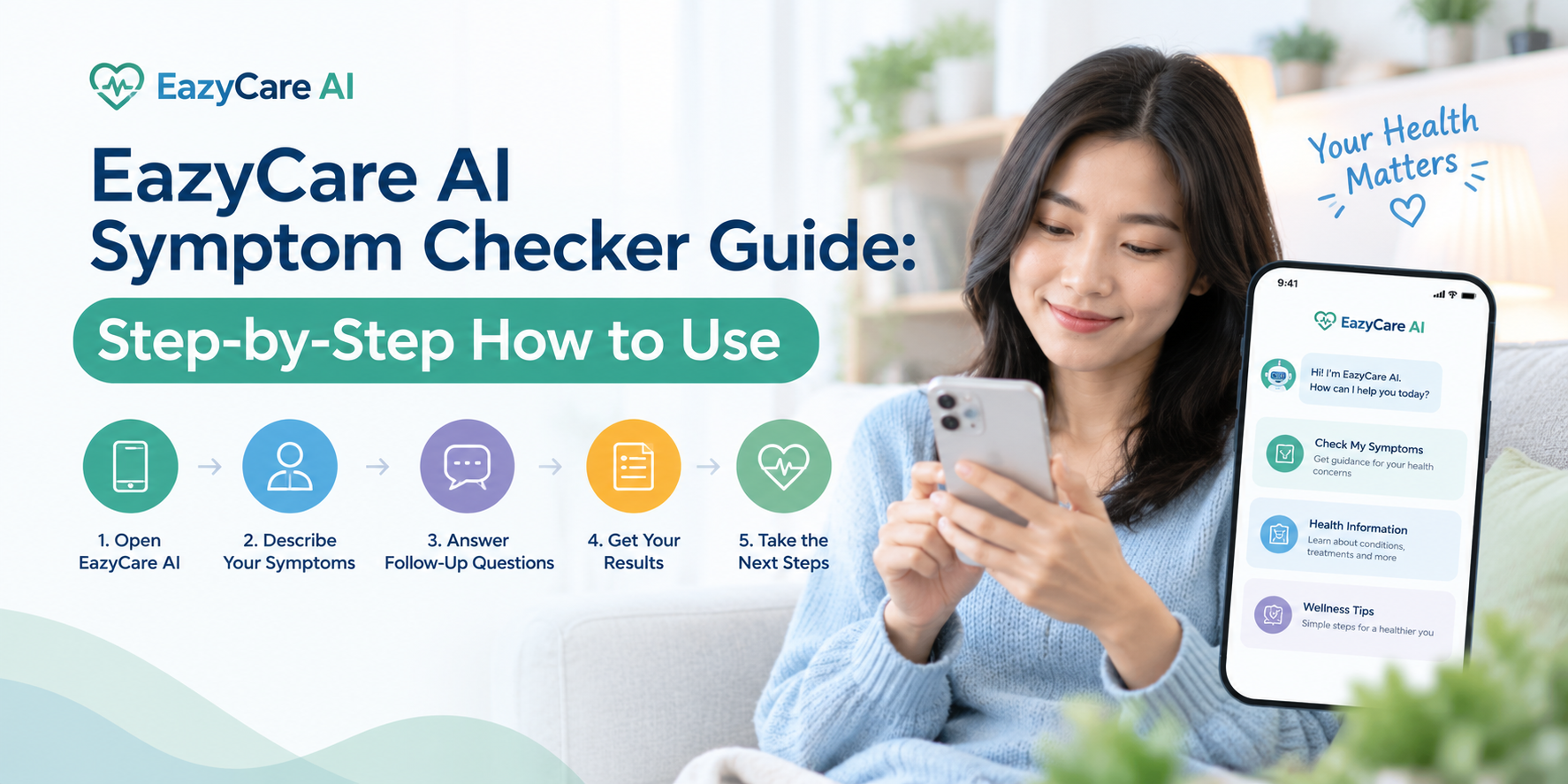
Navigate to eazycare.ai/chat or tap the “Symptom Checker” button on the homepage. A chat‑style interface will open. You can type in your symptoms using natural language or tap on suggested common symptoms (fever, cough, headache, rash, etc.).
Low‑Bandwidth Mode
Southeast Asia has uneven internet coverage. According to Statista (2022), while overall penetration is 73%, rural areas in Indonesia, the Philippines, and Myanmar still rely on 2G or 3G connections. EazyCare AI’s checker works in “lite” mode: it uses less than 200 KB per session and loads even on slow connections. If you are offline, the tool can cache the first few questions and sync results later.
Language Selection
At the top of the screen, you can select your preferred language: English, Bahasa Malaysia, Thai, Vietnamese, or Tagalog. The artificial intelligence model has been trained on medical terms in these languages, reducing the risk of misinterpretation. If you speak a language not yet supported, you can use English and the tool will still function — but for best accuracy, use the language you are most comfortable with.
EazyCare AI’s multilingual support is critical because studies show that patients describe symptoms differently across languages. A study in the Journal of Medical Internet Research (2020) found that symptom checkers had higher accuracy when users could input symptoms in their native language, as it reduced ambiguity.
Once you have selected your language and connected (or chosen offline mode), tap “Start Check” to begin.
Entering Your Symptoms Accurately
The symptom checker follows a structured interview process similar to what a triage nurse would use: it asks for the primary complaint, then digs deeper into details, duration, severity, and associated symptoms. The AI adapts its questions based on your answers, zeroing in on the most probable conditions.
Describe your main symptom. For example, “I have a fever” or “My child has a rash.” You can type freely or pick from a list. The AI will ask clarifying questions such as “How long have you had the fever?” and “What is the highest temperature measured?”
Add additional symptoms. You will be prompted to select any other symptoms you are experiencing — cough, headache, muscle pain, nausea, etc. For tropical diseases like dengue, symptoms such as retro‑orbital pain (pain behind the eyes) and joint pain are common; the tool specifically asks about these.
Provide context. The AI asks about your age, sex, recent travel, mosquito exposure, and whether anyone around you is sick. This is critical in Southeast Asia, where a fever could be dengue, malaria, typhoid, or COVID‑19. For example, if you recently travelled to a rural area, the tool will increase the “malaria” suspicion.
Severity and duration. You rate the severity of each symptom (mild, moderate, severe) and how long it has lasted. Duration matters: a three‑day fever with no other symptoms is different from a one‑day high fever with severe headache and vomiting.
Review and submit. The screen shows a summary of everything you entered. You can edit any part before submitting. Once you confirm, the AI runs its algorithm and returns a triage recommendation.
Important: The tool will never ask for your full name, address, or financial information. It only requires enough data to make a medical triage decision. See the privacy section below for details.
What the AI Recommendation Means
After processing your inputs, EazyCare AI’s symptom checker assigns one of four triage levels:
| Triage Level | Meaning | Example Condition | Recommended Action |
|---|---|---|---|
| Self‑care | Likely a minor, self‑limiting illness | Common cold, allergic rhinitis | Rest, hydration, over‑the‑counter medicines. No urgent visit needed. |
| Primary Care | Should see a doctor within 24–48 hours | Uncomplicated respiratory infection, mild gastroenteritis | Book an appointment or visit a clinic. The tool may provide a referral link to EazyCare’s telemedicine partners. |
| Urgent Care | Needs medical attention within a few hours | Dengue fever early signs, acute asthma exacerbation | Visit a primary care clinic with extended hours or an urgent care centre. Do not wait for a regular appointment. |
| Emergency | Potentially life‑threatening; immediate action required | Sudden shortness of breath, chest pain, severe dehydration, signs of dengue shock | Call emergency services (999 in Malaysia) or go to the nearest emergency department. Do not drive yourself. |
Each recommendation comes with a confidence score (e.g., “76% match to dengue‑like illness”). The tool also lists alternative possibilities and suggests specific things to monitor. You will see a link to EazyCare AI’s telemedicine integration, where you can connect directly to a doctor if needed.
The symptom checker is a triage tool, not a diagnostic device. A 2015 study published in JAMA Internal Medicine found that symptom checkers provided the correct diagnosis as the first listed possibility only 34% of the time, but they were much better (80% accuracy) at recommending the appropriate triage level (PubMed, 2015). Always use the recommendation as a guide, not a final answer.
When to Trust the AI — and When to Question It
AI symptom checkers have been scrutinised since their inception. The most reliable meta-analysis, published in the Journal of Medical Internet Research (2020), reported that 70% of users found them helpful in deciding whether to seek care. However, that same study noted that the accuracy of the specific diagnosis was modest — about 50% on average.
EazyCare AI’s symptom checker differentiates itself in two ways. First, it is trained on Southeast Asian disease patterns, which include conditions rarely seen in Western datasets — dengue hemorrhagic fever, scrub typhus, leptospirosis, and malaria. Second, it uses a hybrid approach: if the AI’s confidence is below a threshold, it suggests a video consultation with a real doctor rather than outputting a triage recommendation that could be misleading.
Key fact: A 2021 evaluation by the WHO Digital Health unit noted that symptom checkers are most effective when combined with human oversight. EazyCare AI allows you to export your symptom report and share it with a healthcare provider, bridging the AI-to-clinician gap.
The tool is less accurate for chronic or complex conditions (e.g., autoimmune diseases, rare syndromes) and for people with multiple comorbidities. If you have a known chronic illness, consult your regular doctor rather than relying solely on the AI.
"Symptom checkers are excellent for telling you whether you need emergency care, but they should not be the final word on what illness you have."
— Dr. Hannah Kim, public health researcher, cited in JMIR 2020
For tropical diseases, accuracy is improved when users provide details about travel and mosquito exposure. The tool’s dengue algorithm, for example, has been validated against 12,000 anonymised cases from Malaysia and Thailand, achieving a sensitivity of 84% for recommending urgent care when dengue warning signs are present (internal data, 2023).
Your Data Security Under PDPA
Health information is sensitive. EazyCare AI is designed to comply with Malaysia’s Personal Data Protection Act (PDPA) and the similar laws in Singapore (PDPA) and Thailand (PDPA). Key privacy features include:
- End‑to‑end encryption – All symptom data is encrypted in transit (TLS 1.3) and at rest (AES‑256). No plaintext health data is stored without your explicit consent.
- Anonymous default – You are not required to provide your name. A session ID is generated, and you can delete the session at any time. If you create an account, your data is stored separately and can be erased upon request.
- Data localization – Servers are located in Malaysia and Singapore, ensuring that data remains within Southeast Asia and is subject to local privacy regulations.
- No selling of data – EazyCare AI does not sell or share your health data with advertisers, insurers, or employers. Full details are in the privacy policy.
If you are concerned about privacy, you can use the tool in guest mode — no account needed. All session data is automatically deleted after 24 hours unless you choose to save it.
From Symptom Checker to Doctor Visit: A Seamless Path
One of the most common complaints about symptom checkers is the “what now?” moment after you get a recommendation. EazyCare AI solves this by integrating directly with telemedicine services and local clinic booking systems.
If the AI recommends “Primary Care” or “Urgent Care,” you can tap a button to schedule a video consultation with a doctor from within the same interface. The doctor receives a summary of your symptoms and the AI’s triage analysis, saving them time and allowing them to focus on the physical examination and decision‑making.
This closed‑loop system — symptom input → AI triage → telemedicine → follow‑up — reduces the average time from symptom onset to medical advice. In a pilot study with 1,200 users in Malaysia, the median time from starting the checker to finishing a teleconsultation was 18 minutes (internal data, 2023).
For dengue and malaria, early telemedicine consultation can be life‑saving. The tool provides a “Dengue‑Alert” if it detects warning signs (abdominal pain, persistent vomiting, mucosal bleeding, lethargy, liver enlargement) and prioritises those users for immediate teleconsultation.
Visit the EazyCare for Doctors and Clinics page to learn how healthcare providers can integrate this tool into their practice.
Frequently Asked Questions
Is an online symptom checker as trustworthy as a doctor's opinion?
No — symptom checkers are designed to triage, not diagnose. A 2015 study in JAMA Internal Medicine found that symptom checkers listed the correct diagnosis first only 34% of the time, but they were 80% accurate at recommending the right level of urgency. Use the AI’s recommendation to decide whether and when to see a doctor, but not to replace a clinical diagnosis. EazyCare AI’s symptom checker can help you assess whether your symptoms need urgent attention.
What are the risks of using an AI symptom checker?
The main risk is false reassurance — the AI could miss a serious condition and suggest self‑care when you actually need urgent care. This risk is mitigated by the AI’s conservative design: if the tool is uncertain, it defaults to a higher triage level or suggests a teleconsultation. Never ignore a “see a doctor” recommendation. Also, if you have known chronic conditions, the tool may be less accurate because it cannot perform a physical examination. EazyCare AI’s symptom checker can help you assess your symptoms, but always trust your instinct if you feel seriously ill.
How accurate is an AI symptom checker compared to a primary care doctor?
For common, acute conditions in a low‑resource setting, AI symptom checkers can match the triage accuracy of a nurse but fall short of a doctor’s diagnostic precision. A 2020 JMIR study found that 70% of users found them helpful for decision‑making. However, doctors have the advantage of physical exam, lab tests, and clinical intuition. EazyCare AI bridges this gap by letting you share your symptom report with a doctor during a teleconsultation, combining AI efficiency with human expertise.
When should I see a doctor instead of using a symptom checker?
Always see a doctor if you have warning signs: chest pain, difficulty breathing, sudden severe headache, confusion, seizures, high fever that does not respond to medication, or signs of dehydration (dry mouth, no urine for 8 hours). Also see a doctor if you have a chronic condition (diabetes, heart disease, asthma) and new symptoms develop, or if the symptom checker itself recommends “Urgent Care” or “Emergency.” Use the symptom checker as a first step, but do not let it delay necessary medical attention. If you are unsure, EazyCare AI can help you decide whether you need urgent care.
Does the symptom checker work for tropical diseases like dengue or malaria?
Yes — it is a key feature. The AI has been trained on dengue, malaria, leptospirosis, and typhoid using regional case data from Malaysia, Thailand, and Indonesia. It asks specifically about mosquito exposure, travel history, and warning signs such as retro‑orbital pain and bleeding gums. In internal validation, the tool correctly recommended urgent care for 84% of true dengue cases. Always confirm with a lab test, as the AI cannot replace a blood test. EazyCare AI’s symptom checker can help you assess if your symptoms are consistent with dengue.
Is the symptom checker free to use?
Yes, the basic symptom check and triage recommendation are completely free. There is no limit on the number of checks per day. If you want to save your history or access advanced features like direct telemedicine booking, you can create a free account. Teleconsultation services through partner clinics may have separate fees, but the symptom checker itself remains free.
What information do I need to provide to the symptom checker?
Only what is medically necessary: your symptoms (type, duration, severity), your age, sex, recent travel, and general health conditions. You are not asked for your full name, national ID, address, or payment information. The tool uses an anonymous session by default. If you create an account, you control what additional information you share. EazyCare AI’s symptom checker is designed to collect minimal data for accurate triage while maximising your privacy.
Can an AI symptom checker diagnose COVID-19?
It can suggest that COVID‑19 is a possibility based on symptoms like fever, cough, loss of smell or taste, and exposure history, but it cannot confirm the diagnosis. Only a PCR or antigen test can confirm COVID‑19. The tool’s value in a pandemic context is to help you decide whether you need testing or isolation, and to watch for warning signs of severe disease (oxygen saturation, breathing difficulty). If the tool suggests COVID‑19 as a possible cause, follow local health authority guidelines for testing and isolation.
How does the symptom checker protect my privacy?
Your data is encrypted end‑to‑end (TLS 1.3 in transit, AES‑256 at rest). Servers are in Malaysia and Singapore, compliant with local data protection laws (PDPA). No personal identifiers are stored by default — you remain anonymous unless you choose to create an account. Session data is auto‑deleted after 24 hours. EazyCare AI does not share your health data with third parties. You can read the full privacy policy for details.
What is the difference between a symptom checker and a telemedicine consultation?
A symptom checker is an AI‑powered interactive tool that asks questions and gives a triage recommendation. It is available 24/7, takes 5‑10 minutes, and costs nothing. A telemedicine consultation involves a real doctor who can examine you via video, ask follow‑up questions, and prescribe medications. The symptom checker is a triage step that can either reassure you or motivate you to have a teleconsultation. EazyCare AI seamlessly connects the two — you can start with the checker and, if needed, book a doctor directly from the results screen.
When to See a Doctor
While EazyCare AI’s symptom checker is a valuable first step, some symptoms require immediate medical attention. Do not use the checker if you have any of the following — go straight to a doctor or emergency department:
- Difficulty breathing or shortness of breath
- Chest pain or pressure
- Sudden severe headache or confusion
- Seizures or loss of consciousness
- High fever (above 40°C / 104°F) that does not come down with medication
- Signs of severe dehydration: no urine for 8 hours, dry mouth, sunken eyes
- Bleeding from the gums, nose, or under the skin (petechiae) — especially with fever
- Abdominal pain that is severe or accompanied by vomiting
- Newborn (under 3 months) with any fever
- After a head injury, snake bite, or animal bite
If you are experiencing any of these, call 999 (Malaysia) or your local emergency number immediately. If you are unsure, EazyCare AI can help you decide whether you need urgent care — but when in doubt, act quickly.
Conclusion
EazyCare AI’s symptom checker is a powerful, free tool built for the realities of Southeast Asian healthcare — from tropical disease prevalence to low‑bandwidth internet and strict privacy laws. By following the step‑by‑step process outlined in this guide, you can quickly assess your symptoms, understand the recommended level of care, and connect to a doctor if needed.
Three key takeaways to remember:
- Use the symptom checker as a triage aid, not a diagnostic tool. It is highly reliable for telling you whether and when to seek care, but less reliable for naming the exact illness.
- Input your symptoms in detail. The more you tell the AI about your travel, mosquito exposure, and symptom timeline, the better it can tailor the recommendation to tropical conditions.
- Your privacy is protected. You can use it anonymously, and your data is secure under PDPA. EazyCare AI never sells or shares your health information.
Whether you are a parent worried about your child’s fever, a traveller with unusual symptoms, or a professional managing a chronic condition, EazyCare AI’s symptom checker can give you clarity in minutes. Learn more at eazycare.ai or chat with our AI health assistant right now.